
Microsoft Power Platform gives IT teams a credible path to building a custom Project Management Office application. Power Apps can handle project interfaces, Dataverse can store structured data, Power Automate can manage approvals, and Power BI can provide portfolio reporting.
The technical pieces are available. The harder decision is deciding how much of the PMO system your organization wants to create and own.
A custom build offers greater control over processes and integrations. A packaged PPM solution starts with established project management structures and shifts part of the ongoing product responsibility to a software provider. Comparing those options means looking beyond initial functionality and examining cost, development capacity, governance, reporting, support, and future change.
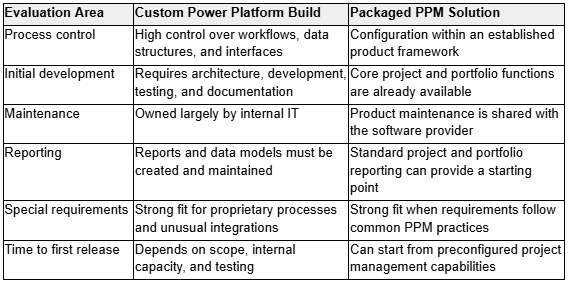
Power Platform PMO: Build vs. Buy at a Glance
Compare the Process Requirements First
A build-versus-buy assessment should start with the PMO process rather than Power Platform features.
List what the organization actually needs to manage. Common requirements include project requests, approvals, project setup, task management, risks, issues, status reporting, portfolio oversight, resource information, and document management.
Then separate standard PPM requirements from genuinely distinctive ones.
A project request form with an approval flow may need company-specific terminology, fields, and approval thresholds. Those changes can often be handled through configuration. A request process connected to several proprietary operational systems may present a stronger case for custom engineering.
The distinction matters because custom code, automation, and data structures create a continuing ownership commitment.
Custom Development Gives IT More Control
The strongest argument for building is control.
An internal Power Platform team can shape an application around specific business processes rather than adapting processes to an existing product. Developers can create custom Dataverse structures, Power Apps experiences, Power Automate workflows, integrations, and Power BI models around internal requirements.
This approach can make sense when the PMO supports unusual governance models, specialist project types, proprietary systems, or processes closely tied to other internal applications.
Control also creates responsibility. IT owns the architecture choices, application lifecycle, testing procedures, documentation, security configuration, support model, and future development backlog.
A successful prototype may become a business-critical system surprisingly quickly. Once teams manage active projects through it and executives depend on its reports, the application needs the same operational discipline as other enterprise software.
Buying Reduces the Amount IT Has to Create
A packaged PPM solution begins with project management structures already in place.
Instead of defining every entity, workflow, view, dashboard, and project template internally, IT can focus on matching an existing framework to organizational processes. Configuration still requires planning, but the starting point is different.
For organizations already committed to the Microsoft ecosystem, Microsoft 365 project portfolio management software can provide preconfigured project and portfolio capabilities built around Microsoft technologies such as Power Apps, Power Automate, Power BI, Dataverse, Teams, and SharePoint.
The buying model can therefore appeal to IT departments that want Microsoft 365 alignment without taking responsibility for creating an entire PPM product internally.
Compare Total Ownership Cost, Not the First Release
Initial development cost can make a custom application look attractive, particularly when Power Platform skills already exist inside the organization.
The first release tells only part of the story.
A custom PMO may require ongoing investment in:
• Solution architecture and development
• Power Apps changes
• Dataverse administration
• Power Automate maintenance
• Power BI development
• Testing and release management
• Security reviews
• User support
• Documentation
• Training
• Developer knowledge transfer
A packaged product introduces licensing and implementation costs instead. It can also reduce the amount of core product development assigned to internal teams.
Compare both options across several years. Developer hours, support effort, change requests, testing, and administration belong in the custom-build calculation alongside the original project budget.
Look Closely at Internal Power Platform Capacity
Having Power Platform expertise does not automatically mean a PMO application is the best place to spend it.
Many internal development teams already support departmental applications, automation projects, Microsoft 365 administration, reporting, integrations, and broader digital initiatives.
Adding a PMO system creates another long-term application portfolio commitment.
Capacity also needs to survive personnel changes. If one developer knows most of the application’s business rules, workflows, and Dataverse relationships, losing access to that knowledge can slow support and future development.
Strong documentation and application lifecycle practices reduce this risk. A mature internal Power Platform team may already have those disciplines in place. Smaller teams may see greater value in starting from supported PPM software.
Evaluate the Data Architecture Early
Power Apps interfaces are visible, so they often receive attention first. The underlying data model has greater long-term consequences.
A PMO may need connected records for projects, programs, portfolios, requests, tasks, risks, issues, resources, approvals, and reporting periods. Those relationships affect automation, permissions, reporting, and future integrations.
Weak architecture can lead to duplicated information and inconsistent portfolio reports. Fixing those problems after adoption usually requires more work than addressing them during design.
A packaged solution provides an established model for common PPM information. A custom build allows greater freedom, but the internal team must make and maintain those architectural decisions.
Portfolio Reporting Can Become a Major Development Stream
A PMO rarely needs one dashboard.
Project managers may need detailed delivery information. PMO leaders may want cross-project status, risks, resource information, and overdue work. Executives often need concise portfolio views with the option to inspect individual initiatives.
Building those reports involves more than Power BI visual design. IT also needs consistent definitions, calculation logic, data quality standards, refresh processes, and access controls.
Each new reporting request can add another item to the internal development backlog.
Packaged PPM products can shorten this work when established project and portfolio dashboards already cover much of the requirement. Custom Power BI development can then concentrate on organization-specific reporting rather than recreating every standard view.
Factor Governance and Support Into the Decision
Running an application inside Microsoft 365 does not remove application governance responsibilities.
IT still needs clear rules covering project creation, sensitive data access, workflow changes, production deployments, administrator permissions, and support escalation.
Consider a failed approval flow during project intake. Who diagnoses it? What happens when a portfolio dashboard displays incorrect information before an executive review? How quickly can another developer support the application if its original creator is unavailable?
These scenarios expose the difference between building an application and operating a dependable business system.
Think About How the PMO Will Change
Most PMOs do not remain static.
An organization may begin with simple project intake and status reporting, then add portfolio governance, additional project types, resource management, new dashboards, or more structured approval processes.
Both build and buy approaches can support change, but the work lands in different places.
Custom development gives the internal team direct control over the roadmap. Each improvement also competes for development capacity. A configurable PPM product provides an existing framework for common changes while leaving room for business-specific extensions where supported.
IT teams should therefore assess the expected PMO maturity path, not only present-day requirements.
When Building a Power Platform PMO Makes Sense
A custom build can be a strong choice when:
• The organization has highly specialized project processes.
• Proprietary integrations make standard PPM products a poor fit.
• An experienced Power Platform team has capacity for continuing development and support.
• Application lifecycle management practices are already established.
• The business value of custom functionality outweighs its long-term ownership cost.
In those conditions, Power Platform gives IT considerable control over how the PMO system works.
When Buying a PPM Solution Makes More Sense
Buying deserves stronger consideration when:
• Most requirements follow established project and portfolio management practices.
• The organization wants standardized project templates and governance sooner.
• Portfolio reporting would otherwise require substantial internal development.
• Power Platform specialists have limited capacity for another permanent application.
• The PMO wants a configurable foundation that can expand as processes mature.
The central question is how much differentiation custom development will actually create.
Build What Makes the Organization Different
Power Platform makes custom PMO development possible, but technical possibility should not decide the investment.
Compare the two approaches according to ownership, development capacity, data architecture, governance, reporting, support, user adoption, and expected change. Standard PPM requirements may offer little return from being rebuilt internally. Proprietary processes may justify the additional work.
A useful principle is simple: configure common project management capabilities and reserve custom engineering for requirements that create meaningful business value.
That approach gives IT teams a clearer basis for deciding what to build, what to buy, and where internal Power Platform expertise can make the greatest contribution.